How to make a LED blinking circuit using transistors on a breadboard. This is perfect for beginners, to understand the principles of electronics, paving the way for future experiments and project development, fueling future experiments and project growth.
Gather Materials:
Ensure you have all the necessary components:
- Breadboard - 1 pc
- LED - 2 pcs
- Resistor 510 Om - 2 pcs
- Resistor 33 kOm - 2 pcs
- Electrolytic capacitor 22uF - 2 pcs
- Transistor S9014 - 2 pcs
- Jumper Wires
Circuit diagram:

Create the Circuit Layout:
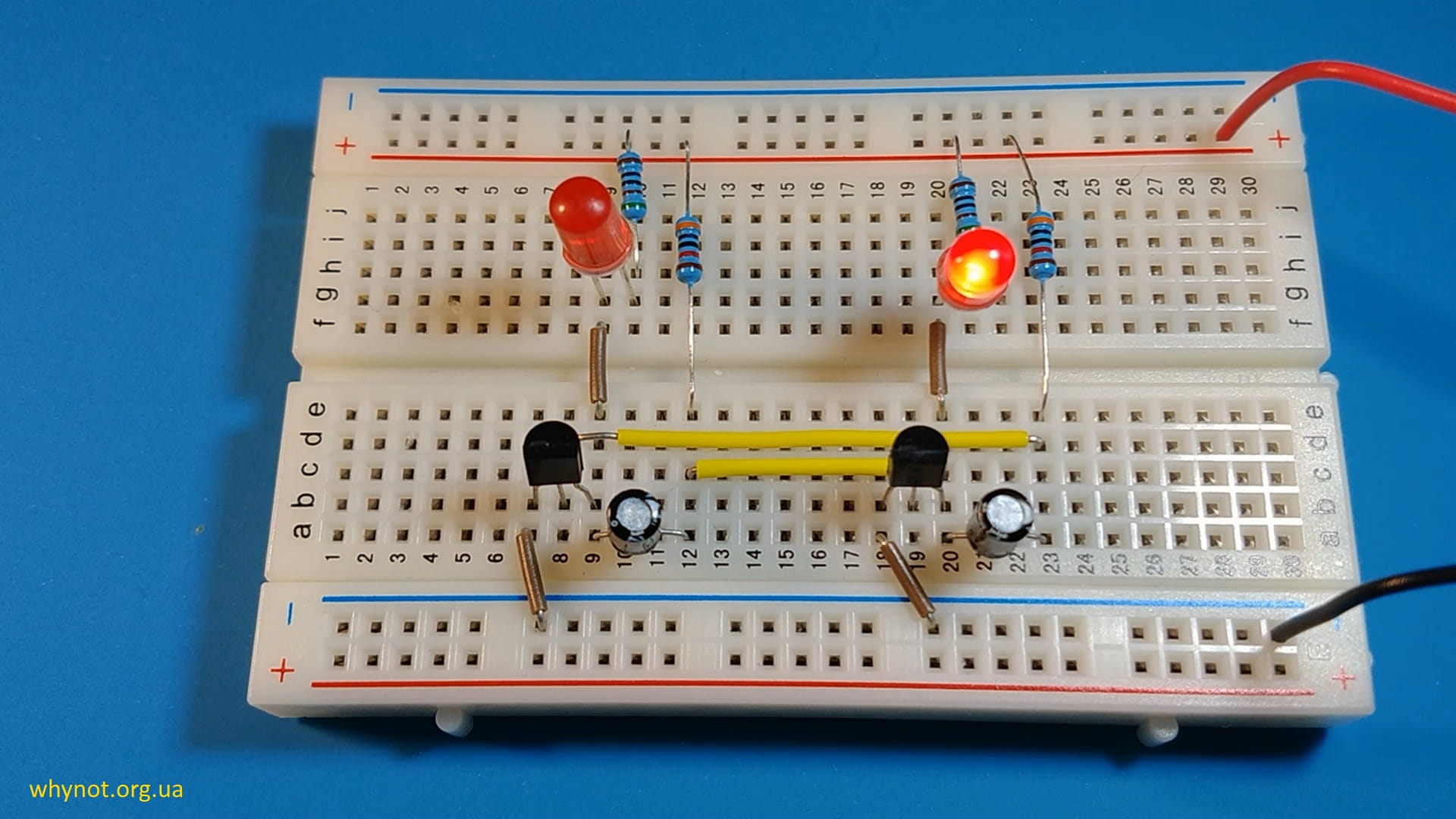
Place the components on the breadboard according to circuit diagram as follows:
1) Place the transistor Q1 (S9014) on the breadboard as follows:
- Emitter (E) pin: Insert into column 7 and row b (b7).
- Base (B) pin: Insert into column 8 and row b (b8).
- Collector (C) pin: Insert into column 9 and row b (b9).
2) Insert the positive pin of the electrolytic capacitor C1 (22uF) into column 9 and row a (a9) and negative pin into column 12 and row a (a12).
3) Insert one end of the wire into into column 7 and row a (a7) and second one end of the wire into negative supply of breadboard.
4) Insert one end of the wire into into column 9 and row e (e9) and second end of the wire into column 9 and row f (f9).
5) Insert the positive pin (longer leg - anode) of the LED into column 10 and row g (g10) and negative pin (shorter leg - cathode) into column 10 and row g (g10).
6) Insert one pin of the resistor R1 (510) into into column 10 and row h (h10) and second pin into positive supply of breadboard.
7) Insert one pin of the resistor R2 (33k) into into column 12 and row e (e12) and second pin into positive supply of breadboard.
8) Insert one end of the wire into into column 12 and row c (c12) and second end of the wire into column 19 and row c (c19).
9) Insert one end of the wire into into column 8 and row d (d8) and second end of the wire into column 23 and row d (d23).
10) Place the transistor Q2 (S9014) on the breadboard as follows:
- Emitter (E) pin: Insert into column 18 and row b (b18).
- Base (B) pin: Insert into column 19 and row b (b19).
- Collector (C) pin: Insert into column 20 and row b (b20).
11) Insert the positive pin of the electrolytic capacitor C2 (22uF) into column 20 and row a (a20) and negative pin into column 23 and row a (a23).
12) Insert one end of the wire into into column 18 and row a (a18) and second end of the wire into negative supply of breadboard.
13) Insert one end of the wire into into column 20 and row e (e20) and second end of the wire into column 20 and row f (f20).
14) Insert the positive pin (longer leg - anode) of the LED into column 21 and row g (g20) and negative pin (shorter leg - cathode) into column 20 and row g (g20).
15) Insert one pin of the resistor R3 (33k) into into column 21 and row h (h21) and second pin into positive supply of breadboard.
16) Insert one pin of the resistor R4 (510) into into column 23 and row e (e23) and second pin into positive supply of breadboard.
It should be like following:
Also you can watch the video instruction:
Connect Power Supply:
Connect the power supply 3-14 volts DC. Ensure the polarity is correct: the positive terminal to the positive rail (red line) and the negative terminal to the ground rail (blue line).
Test Your Circuit:
Once everything is connected, double-check the connections for any mistakes. Then, turn on the power supply. If everything is correct, the LEDs should start blinking at regular intervals.
Experiment and Learn:
Now that you have a basic LED blinking circuit, take the opportunity to experiment further. Try changing the resistor values or capacitor values to alter the blinking frequency.
Safety Precautions:
Always handle electronic components with care, especially when dealing with power sources. Ensure proper polarity when connecting components to avoid damaging them. Never connect a LED directly to a power source without a current-limiting resistor.
Conclusion:
Creating a LED blinking circuit using transistors on a breadboard is an excellent starting point for beginners in electronics. By following this step-by-step guide and understanding the principles behind each component, you'll gain valuable insight into circuit design and be well-prepared for more advanced projects in the future. Happy tinkering!
Date: 29.03.2024